
Pricing Guide: Cost Factors and Estimate for
Sage X3 ERP Software
UPDATED AUGUST 2026
So, even though the complex nature of enterprise-level software doesn't really allow us to give a one-off price, we've broken down all of the factors that could affect the price of your Sage X3 solution and created a sample pricing model for one of the simplest implementation scenarios below. Basically, the cost of Sage X3 is determined by 5 key factors: the base configuration, the number and roles of users, the add-on modules needed for your business functions, how you plan to deploy the software, and service costs. A little more information about each of these cost factors is outlined in the sections below.
An X3 annual subscription starts at $25,000 before implementation; here's an example:
Without addressing all license combinations and options, a Sage X3 5-Full User Manufacturing bundle with subscription pricing starts at $25,000 annually for an on-premises installation, plus RKL eSolutions services to implement. Services estimates are scoped individually for each project based on complexity and are considered one-time costs.
Services estimates to implement Sage X3 start at $150,000 and are refined during the mutual discovery with client input. RKL also offers personalized annual support plans at varying price packages based on demand and need. Total implementation cost typically ranges anywhere from $200,000 – $300,000 but could run significantly higher for a very complex project.
So, yes, if you want a quote for your specific business case, you will still have to contact us, but we hope that in the meantime this guide helps you get started.
Need a Full Quote?
Sage X3 Base Package + Add-On Cost
Which bundle do you need? Sage has preconfigured bundles for M&D Companies: Financials, Distribution or Manufacturing. These bundles are cumulative, meaning the Distribution includes Financials, and Manufacturing includes both Distribution and Financials.
Growing companies augment these packages with a range of à la carte add-on modules as their needs evolve. Add-on Sage X3 modules deliver advanced capabilities such as:
- EDI
- Scheduling
- Document Management
- AP/AR Automation
- Advanced Reporting and Dashboarding

Pricing for Each User Level
How many users will you have on your Sage X3 platform and in what role?
Sage X3 allows for unlimited named users and licenses based on the number of users concurrently using the platform in a given role. This logic automatically delivers role-based security access and restrictions, thereby simplifying user setup and maintenance. Roles that require less functionality are also cheaper, too!
From most to least expensive, standard Sage X3 user types and licensing costs include:
- Sage X3 Administrator - Designed for IT Administrators to complete system maintenance and manage back-end functions
- Full User - Assigned to high-level leaders for complete access to all Sage X3 features and functions
- Accounting Users - For the core accounting team to manage budgeting, accounting, and fixed assets transactions
- Operational Users - Typically, these users are participating in the sales cycle, from inventory management to purchasing and sales
- Manufacturing Users - Managers and machinists who need distribution and production capabilities
- Transactional Users- For everyone else to input PO Requisitions and expense entry
- Mobile Warehouse - Handheld devices used to collect distribution and production data
Reporting licenses are further defined as:
- Report Full User - Can create and modify reports, dashboards and insights
- Report Viewer User - Can consume all reporting data, dashboards and insights
Typical Sage X3 User Types by Role
| Sage X3 User Type | Platform Access | Associated Job Roles |
|---|---|---|
| Administrator | Security setup, maintenance, and database tools | CIO Project Managers IT Administrators |
| Full User | All functions across the application | CFO Executives Controller Account Managers |
| Accounting User | Budgeting, accounting, and fixed assets transactions | Accounting Specialists AR & AP Assistants Clerks Coordinators |
| Operational User | Inventory management, purchasing and sales | COO Salespeople Customer Service Procurement Specialists Purchasing Agents Buyers |
| Manufacturing | Distribution and production capabilities | COO General Managers Operations Managers Manufacturing Engineers Operators & Machinists |
| Transactional Users | Input-only access for PO Requisitions and expense entry | All Employees, where applicable |
Sage X3 Deployment Costs

Hosting Sage X3 on premises vs. in a hosted cloud environment directly affects the cost.
Sage X3 allows flexible deployment, meaning you decide where you install and how you maintain the software. The user experience for Sage X3 is accessed via a browser, extending accessibility from anywhere and on any device, whether you deploy on on-premises servers, private hosting or as a multi-tenant SaaS solution.
ERP Implementation and Cost
Don’t forget services for configuration, training, and go-live.
Now that you’ve secured optimal software licensing and deployment, don’t forget to include our professional services to install, configure, set up, train, and provide post-go-live support of your Sage X3 Investment. Services are individually scoped for each project dependent on requirements and staff capabilities to name a few variables.
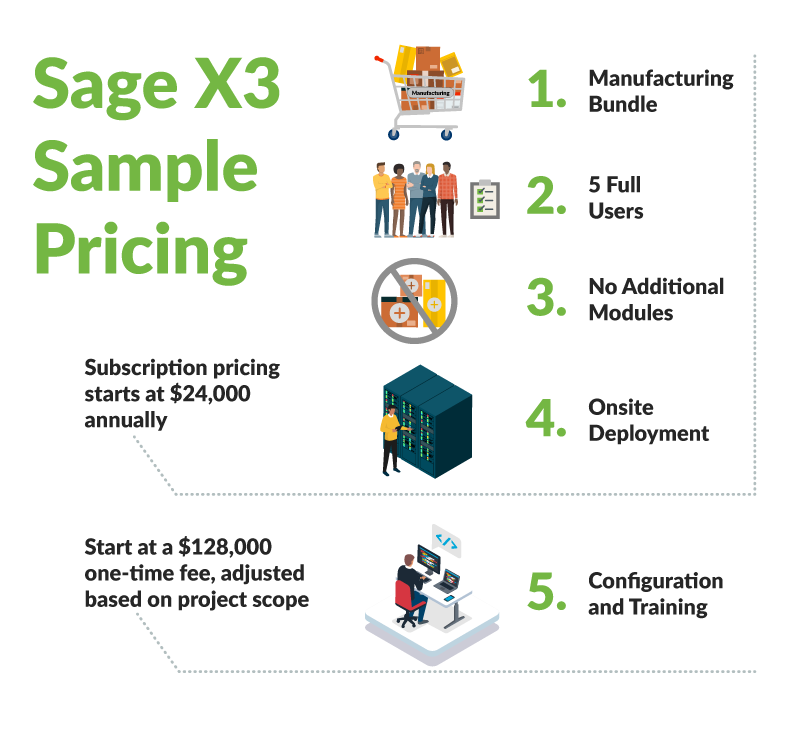
Sage X3 Pricing Example
Without addressing all license combinations and options, a sample 5-Full User Manufacturing bundle with subscription pricing starts at $25,000 annually for on-premises installations plus RKL eSolutions services to implement.
Services estimates are scoped individually for each project based on complexity and are considered one-time costs. Services estimates to implement Sage X3 start at $150,000 and are refined during the mutual discovery with client input. RKL also offers personalized annual support plans at varying price packages based on demand and need.
 Try our Sage X3 pricing calculator to get a base estimate for your company or contact us to discuss your organization’s specific business case.
Frequently Asked Questions about Sage X3 Cost
1. How much does Sage X3 ERP Software cost?
A Sage X3 annual subscription starts at approximately $25,000 before implementation.
2. How much does Sage X3 implementation cost?
RKL eSolutions’ Sage X3 implementation services start at approximately $150,000 and are refined through a mutual discovery process. Total implementation costs typically range from $200,000 to $300,000, but a complex project can cost significantly more.
3. What factors affect Sage X3 pricing?
Five primary factors determine Sage X3 pricing:
-
Base software configuration
-
Number and roles of concurrent users
-
Add-on modules
-
Deployment method
-
Implementation and service requirements
Because these requirements differ by organization, RKL eSolutions scopes each Sage X3 project individually
4. What Sage X3 software bundles are available?
Sage X3 offers preconfigured Financials, Distribution, and Manufacturing bundles for manufacturing and distribution companies. The bundles are cumulative: Distribution includes Financials, while Manufacturing includes both Distribution and Financials
Companies evaluating broader ERP options can also review the other Sage software solutions that we support.
5. Is Sage X3 priced by named user or concurrent user?
Sage X3 allows unlimited named users, but licensing is based on the number of users accessing the platform concurrently in a given role. Available roles include Administrator, Full User, Accounting User, Operational User, Manufacturing User, Transactional User, Mobile Warehouse, Report Full User, and Report Viewer. Roles requiring less functionality generally cost less.
This role-based model helps companies purchase access that matches each employee’s responsibilities rather than assigning a higher-cost Full User license to everyone. RKL’s article about why companies migrate from Sage 500 to Sage X3 provides additional context on Sage X3 role-based licensing
6. Do Sage X3 add-on modules increase the total price?
Yes. Growing companies can add capabilities to their base Sage X3 bundle as their requirements evolve. Available add-ons include EDI, scheduling, document management, AP/AR automation, advanced reporting, and dashboards. The selected modules will affect the total costs for Sage X3 subscription and implementation.
7. Is Sage X3 available in the cloud and on premises?
Yes. Sage X3 can be deployed on on-premises servers, through private hosting, or as a multi-tenant SaaS solution. Users access Sage X3 through a browser, supporting access from different devices and locations. The selected deployment method affects the overall cost.
8. What services should be included in a Sage X3 implementation budget?
A Sage X3 implementation budget should account for professional services to install, configure, and set up the system, train users, support go-live, and provide post-go-live assistance. These services are scoped according to the project’s requirements, complexity, and the capabilities of the customer’s staff. Organizations in formula- and batch-based industries can also explore RKL’s process manufacturing ERP services, which cover ERP selection, implementation, optimization, training, and ongoing support.
9. Is ongoing Sage X3 support included in the implementation price?
Implementation services are considered a one-time project cost. After go-live, RKL provides support, training, software customization, and integration services for our Sage customers to ensure you get the most value from your Sage X3 solution.
10. How can my company get an accurate Sage X3 quote?
An accurate Sage X3 quote requires a discovery process that covers the software bundle, concurrent users and roles, add-on modules, deployment preferences, business requirements, project complexity, training, and support needs. Our sales team uses this information to develop an individualized estimate for software and services. We know that nobody likes an aggressive, pushy sales experience, so our team is trained to learn about your processes and needs to evaluate whether Sage X3 is a good fit for your company before pushing demos or follow-up calls. Learn more about our buyer's journey here.