




Value Right Out-of-the-Box
Sage X3 offers a wide range of standard features included in the initial price point that are hard to find in competitive products, making it one of the most cost-effective ERP solutions on the market.
-1.png)
Web-based by Design
Because Sage X3 is web-native, you get the exact same system whether you access it locally (client/server) or over the web – something few other ERP systems can offer.
.png)
Powerful, Yet Simple
Many ERP systems are too complicated and unsuitable for mid-sized companies. Unless you have deep pockets and can wait several years to “go live”, you’ll appreciate that Sage X3 is simple to implement, easy to use, and customizable when you need it.
.png)
Ready for Global Business
Since thousands of companies worldwide are using Sage X3 across 50+ countries, it’s no surprise that multinational functionality is built right into the software including support for multiple languages, legislation, and currencies.
.png)
Top-Notch Technology
With an open design and top-notch technology, Sage X3 works equally well with Oracle and Microsoft SQL databases and Windows, Unix, or Linux operating systems – providing you with technological “freedom of choice.”

Grows and Adapts With Your Business
Your business is fluid and ever-changing, so Sage X3 is designed to support both your current and future needs. You simply start with the features you need today, then scale up and “turn on” new features and leverage the open architecture to easily reconfigure process flows as your needs change.
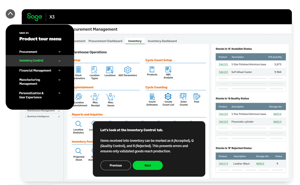 Sage X3 Interactive Demo

Food and Beverage
Avoid costly recalls with advanced allergy tracking and lot tracing.

Pharmaceutical Engineering
Manage inventory levels, supply chain interruptions, formulations, and distribution.
.png)
Cosmetics Development
Maintain top-tier quality assurance with ingredient and supplier tracking.
.png)
Chemical Formulation
Meet strict regulatory requirements with reporting and audit tracking.
.png)
Discrete Manufacturing
Optimize your shop floor through all aspects of production, including labor and overhead.
.png)
Wholesale Distribution
Take control of your inventory and distribution cycle.
 Free eBook: Intelligent Inventory in Sage X3
Download this inventory management guide to solve longstanding inventory problems and maximize efficiency. See how you can use the latest tech such as AI and IoT to get the balance right.
Read the Guide to Learn How to Optimize Inventory Managment
 Free eBook: The Seven Deadly Manufacturing Wastes
Read this guide to find out how you can maximize efficiency by cutting down on waste, making your manufacturing processes fitter and leaner.
Latest Insights
Read our Sage X3 blog posts
RKL ShipStation Integration: Sending Sage X3 Deliveries to ShipStation Orders
By default, Sage X3 does not support integration with ShipStation. However, RKL has developed an integration that is available for purchase. Because ShipStation is a subscription-based service that mu...
Understanding National Bioengineered Food Disclosure Standard Compliance
As consumer awareness and regulatory scrutiny grow, food manufacturers, retailers, and importers must navigate the National Bioengineered Food Disclosure Standard (NBFDS), which mandates transparent d...
%20copy.webp?width=360&name=Sage%20X3%20(16)%20copy.webp)
Mastering Sage X3: Environment Management and Development Best Practices
Unlock the full potential of your Sage X3 system with effective environment management and development practices. Managing an ERP system like Sage X3 is not just about maintaining the software but opt...
