

Adding users or entities in Sage Intacct can trigger immediate license changes and unexpected charges. Before making changes, it’s important to understand Sage’s provisioning terms and the options available to help your organization maintain control over licensing and costs.
Adding Users in Sage Intacct: What to Know Before You Click “Create”
When adding new users (or entities) in Sage Intacct, the alert shown below was acknowledged before the user was created. All purchases are final, and no refunds will be issued. Nonpayment will result in temporary service disruption and access to Sage Intacct.
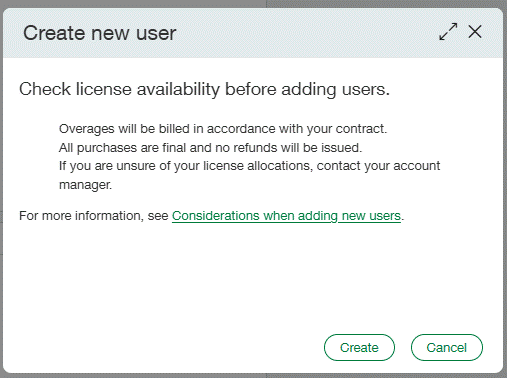
There is no grace period per Sage since you knowingly accepted the terms before hitting ‘Create’.
Before creating a new user, review Considerations when adding new users for guidance on license availability, potential overage charges, and the impact on your organization’s user allocation. To avoid unintended licensing costs, please contact your RKL representative before making any changes to users or entities.
Options for Managing License Changes
- Contact your Sage Customer Success Manager (CSM)
Discuss the proposed change and confirm any licensing impact before creating the user or entity. - Submit the appropriate Sage request form
Use Sage’s process to request the needed licensing or account change. Click here for the form. - Disable self-provisioning
At your request, RKL can install scripts to disable self-provisioning in your Sage Intacct environment. This prevents users from making changes that could automatically create additional Sage invoices.