When it comes to printing AP checks, banks can be surprisingly particular about the layout and wording on each check. One common requirement is the removal of the “Pay:” label from the check face—a detail that can be crucial for compliance with your bank’s standards. Fortunately, starting with Sage 300 CRE (Sage Timberline Office) version 24.2, users have the flexibility to customize their check formats to meet these specific needs.
7 Steps to Remove "PAY:" on Printed AP Checks
- First, navigate to The Sage Desktop. Then go to Help > About and confirm that your version number is higher than v24.2.

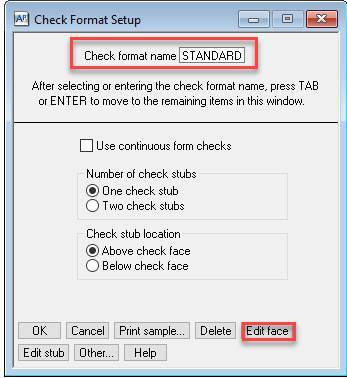
- Next, go to AP > Tools > Check Formats. From there, use the "List" button to select your Check format name, and then click the "Edit face" button.
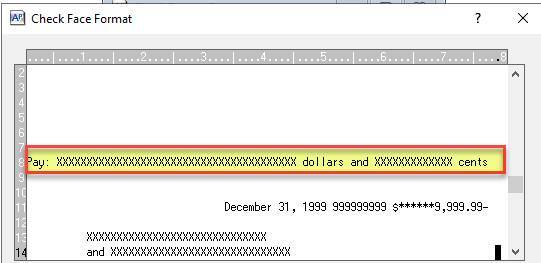
- Now, click on the "Pay" line. Notice that the field name is "Check Protect Amount." Then click on the "Clear field" button and answer "Yes" when it prompts you to "Clear this field?"

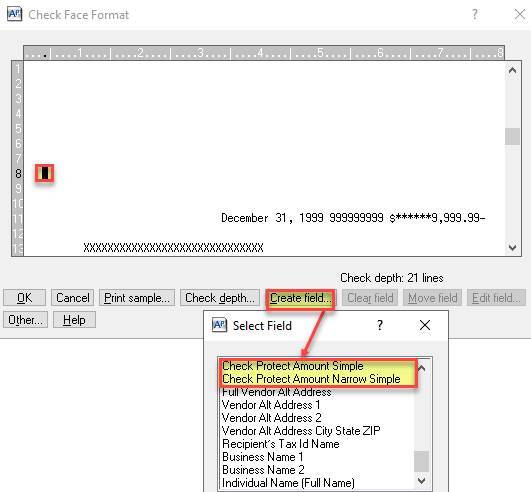
- Place your cursor over the line where you want the new amount placed, and click the "Create field..." button. Then, scroll down and double-click either the "Check Protect Amount Simple" button or the "Check Protect Amount Narrow Simple" button.
- Verify that the amount DOES NOT contain "Pay:" and click "OK."

- Click the "OK" button again and check the print sample to verify that you now have your desired format.
- Close the application to save changes.
Interested in Sage Intacct Construction?
Sage Intacct Construction is the best of both worlds for construction accounting professionals! It combines Sage 300 CRE's construction-focused functionalities, like enhanced WIP reporting and project management, with Sage Intacct's robust cloud-based capabilities. If you're interested in taking a look at Sage Intacct Construction, join one of our coffee break demos!
 Check out these blogs to help get you started!
A Blueprint to Choosing the Right ERP Software for Your Construction Business
Real-Time Insights: Why Sage Intacct Construction is Essential for Financial Management
The Latest Update in Sage Intacct Construction 2025 Release 3