Sometimes, sales order figures may not update automatically when changes occur, such as price adjustments, item modifications, or discounts, leading to discrepancies between system records and the intended transaction values. In these situations, manually recalculating sales order amounts ensures that totals are accurate and up-to-date.
6 Steps for Recalculating Sales Order Amounts
- There is a utility in the AR module, located under the Utility menu, that is used to recalculate customer open order amounts. For the most accurate data, it should be run with all users excluded from the system, especially those in Sales Order Entry.
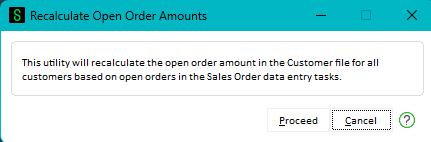
- Click Proceed.
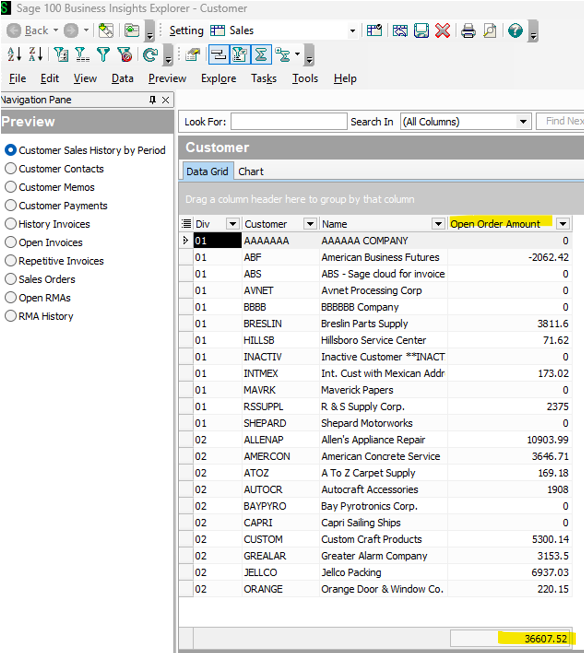
- You can view the Open Order Amount values before and after running the utility in the Explore Menu > Customer View.
-
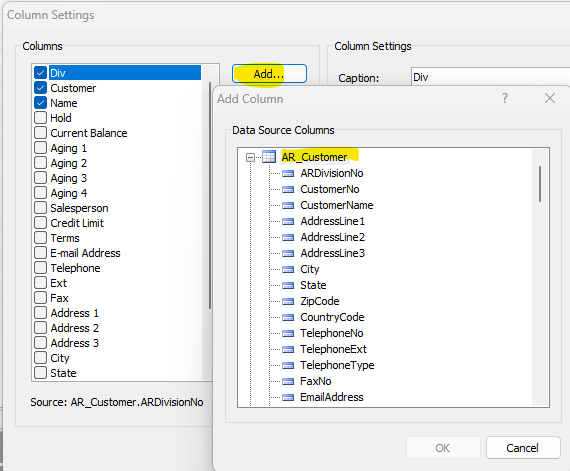
You can add the Open Order Amount field to the View by navigating to Edit menu > Column Settings > Add button and looking for the field in AR_Customer and selecting it.
-
The total of this should match the Sales amount on the Business Insights Sales Dashboard if it is refreshed.
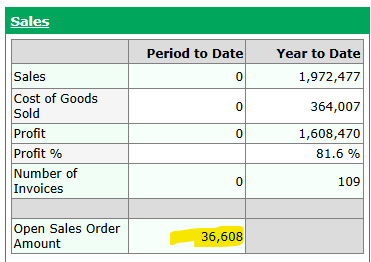
-
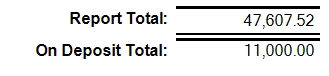
The amount will equal the amount on the Open Sales Order Report if you add the On Deposit Total amount back in. There could be some other factors as to why this might not always be true, but generally this is the case.
Want More Sage 100 Tips & Tricks?
Make sure to subscribe to our blog to stay up-to-date on the latest insights and trends. We're dedicated to providing valuable resources for businesses looking to optimize their financial management with Sage 100.
 Check out these blogs to help get you started!
How to Reverse a Cash Receipt
How to Reverse an Invoice Posted to the Wrong Month
Navigating the Business Insights Explorer Module
How to Improve Your Sales Order Entry Workflow