

In a world where it feels like everyone is trying to jump on the AI bandwagon, it's critical for organizational leaders to take a step back and assess whether there is a real strategic gain in using AI. While everyone wants to move fast to maintain a competitive advantage, it's important to build a safe usage framework for your team before you get started.
At several recent conferences we've attended, AI has been at the forefront of every conversation. Speakers are pushing you to start using AI NOW to avoid falling behind the trends, rather than showing you HOW to strategically benefit your company in the long term.
I attended a session on the "Future of Senior Living AI" by Joe Velderman, Chief Strategy Officer of K4Connect, and Michael Skaff, Chief Information Officer at Sequoia Living, at the LeadingAge California BOLD conference. While the focus was on AI in the Senior Living industry, they highlighted key considerations for ALL companies looking to use AI in their daily operations. This session stood out to me because it wasn't the same cookie-cutter AI session lecturing on the need to use AI in daily activities. Michael and Joe spoke of being thoughtful and partly skeptical as they explored AI. It should be less about rushing to implement and more about whether AI can truly benefit your processes.
Here are several of the top AI Dos and Don'ts that stuck with me.
DON'T: PUT SENSITIVE DATA IN GENERIC FREE AGENTS
Tuning in to the public ChatGPT model for answers and inserting confidential data is not only illegal under HIPAA and other laws, but also puts YOUR company at risk because the chatbot could use your data elsewhere.
A quote that stuck with me: "If you are not paying for it, you are becoming part of the product." If you are using the free version of an AI engine, you are giving it more knowledge to use elsewhere, exposing potentially sensitive and confidential company or client data.
HIPAA requirements are expected to shift in 2026, making it important to implement stronger security controls and policies to safeguard patient data from unauthorized access or disclosure.
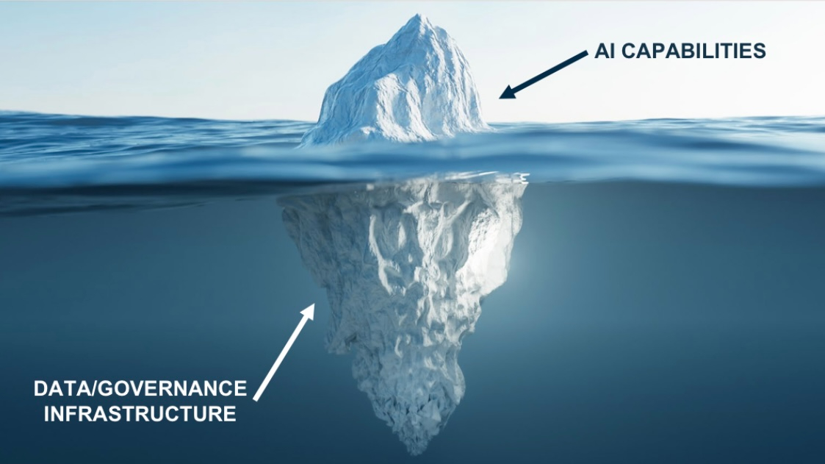
The speakers illustrated this as an iceberg. The shiny capabilities and promise of AI are visible on the surface, but the beast is the governance and infrastructure hidden below that must be figured out in advance.
DO: DEVELOP AN AI POLICY
Whether you are exploring AI or already using it, a clear AI policy is essential for defining lawful use and setting boundaries on where AI is not permitted. This is especially crucial in industries where sensitive information may be at play.
If you're unsure where to start with an AI policy, Skaff suggests asking an AI chatbot to create an AI policy outline. From there, work with others in your organization to tailor it to your specific needs and AI use cases, ensuring your bases are covered.
Another way to avoid putting sensitive data into an AI chatbot without paying for the premium version is for your company to develop its own chatbot. Skaff mentions that this may not be feasible for all companies, but your personal chatbot ensures that company data stays within the company.
DON'T: HAVE AN AI FREE-FOR-ALL
According to LeadingAge & USAging, by 2023, the Senior Living industry will face a 1-million-worker shortage. AI will not solve this problem, but it could buy time to hire the needed individuals.
While it may seem that AI can take jobs and solve the problems of any industry that is understaffed, you need to be thoughtful about how to approach this. AI is not always the answer for every task at every position or level.
AI is not one-size-fits-all. This is why jumping into AI too quickly may not be as glamorous as it sounds.
A notable quote to remember: "We are not trying to slam on the brakes, but rather to use the steering wheel."
DO: STRATEGICALLY LOOK FOR AREAS WHERE AI COULD BE A GOOD FIT
The best place to start when deciding where to implement AI is to look at all your functional areas of your business. Look for a functional area with multiple repetitive tasks and processes involved. When starting from this most basic level, you can analyze where AI could benefit from reducing manual, time-consuming tasks that take too much of your employees' time.
Accounting was a functional area mentioned that involves repetitive, sometimes manual, tasks in data entry, AP and AR workflows, and even document organization.
Lastly, talk to YOUR PEOPLE in the organization. It is important to speak with your employees, as some may lack the capacity or creativity to realize they could be doing it "better" or "faster." Start by asking questions about their workday pain points. What do you like the least about your day? What would you delegate or eliminate?
DON'T: TRY TO USE AI WITH LIMITED DATA
AI can be helpful for predictive analytics, but the key thing to remember is that you need A LOT of data to help the system learn and become the predictive engine you think it can be. You also need the RIGHT data. If you give an AI tool inaccurate data, it will return incorrect answers.
A trend seen across multiple industries is the growth of careers in data-centric roles. AI needs data to learn from your organization's expectations, the mood and tone of writing, and workflow processes.
Without this established groundwork of processes and clear data, AI will be able to learn and predict, but it will be wrong.
DO: ENSURE YOU HAVE GOOD GROUNDWORK IN PLACE
The key is to have a strong Human Resources system, Financial Processes, and (in senior living specifically) an Electronic Health Records system to lay the groundwork for success. Having a strong grasp of your internal processes enables you to investigate the functional areas.
Seeing the routine processes at play can help you identify repetitive tasks, which are an early indication of opportunities for AI and automation.
Having standard processes can also aid in the production of an AI policy, allowing each department to have a say over use cases for AI and rules for when and when not to use it. AI cannot augment a workflow that has too many nuances or gaps. It needs defined rules, steps, and systems.
DON'T: IMPLEMENT AND WING IT
Working with AI is like any modern technology or system: you are not sure how it will go unless you try it to see where it works and how it can benefit.
"Winging it" without a phased rollout, a structured AI policy, or proper oversight can lead to legal issues when managing sensitive data and limited visibility into how your employees are using it. You need to have a vision, frame the "why," provide guidelines, train, test, and finally evaluate. How will you know if you are successful if you do not create the structure?
DO: ASSESS, GOVERN, AND PILOT
The speakers of the session formed the process of adopting AI as an "Assess, Govern, and Pilot" feedback loop.
-
Assess: As mentioned above, this is where you identify your pain points, problem areas, and repetitive tasks to see where there is an opportunity to use AI or automation.
-
Govern: This relates to defining your expectations (including developing an AI policy). Determine what tangible value should be required to see results for AI use (reduced time in manual processes, more items completed in a certain time, etc.).
-
Pilot: Where you slowly roll out your use of AI and monitor for success metrics. This could be time-based or a review of its impact on your workflows.
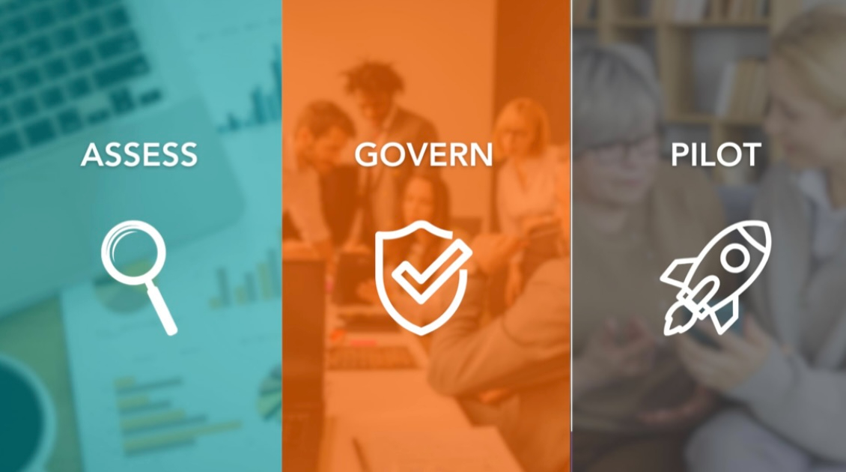
This process acts like a feedback loop. Document, analyze the results, identify the gaps, and provide your employees with the tools they need to improve their jobs.
While AI seems like this shiny new tool you must implement at this very moment, there are more things to think about than just putting something in the AI and receiving an answer. You may want the competitive advantage of using AI, but without the structure and policy, it can become a legal nightmare. Legality alone should be enough to make you pause and encourage stronger oversight of where this can help—rather than harm—your organization.
Technology alone will not deliver the impact you expect, but with the right structure, strategy, and advisors, you can begin automating your manual, repetitive tasks.
For more questions about automating your manual and repetitive accounting tasks, reach out to RKL eSolutions. For a deeper dive into how Sage is slowly incorporating AI into its Sage Intacct software, look at this blog about Copilot.