The beginning of the new year brings a range of new features and improvements. This R1 2026 update includes newly released tools, AI-powered automation in various features, and multiple enhancements now available for general use. Further information about these updates can be found in the details below.
AI-Powered Automation
Email domain for AP Automation is changing: Between February 13 and 16, all organizations will transition to the new email platform. This updated domain introduces several highly requested features, including automated forwarding rules, support for additional file formats, and enhanced notifications to alert users when documents are not processed successfully.
AP Automation now predicts tax details: This update minimizes manual data entry and increases automation efficiency. It is applicable to transactions summarized in a single line as well as those that list all individual line items and their respective amounts. Learn more here.
Company and Administration
AI-powered import agent: The import service now features AI-powered tools for transforming your data within the import service workspace, along with improved mapping capabilities to streamline the import process. See how it works.
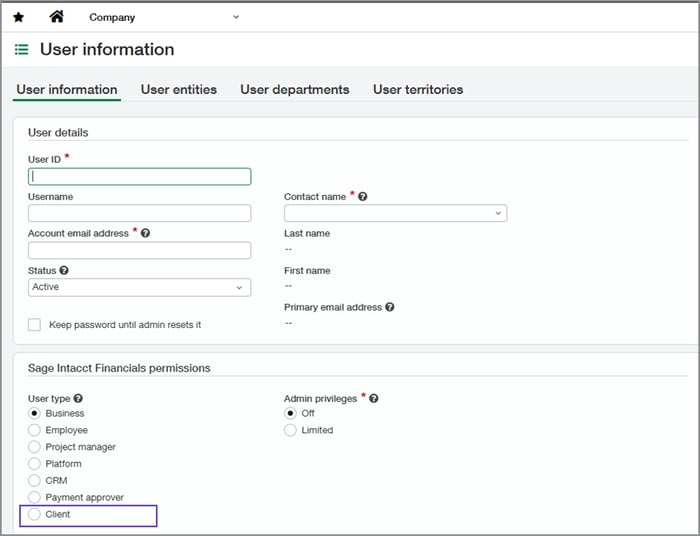
New client user type-Consoles: Specifically developed for Accounting console instances, the Client user type grants customers broader access compared to the Payment Approver user type, allowing them to perform additional tasks beyond payment approvals.
Accounts Payable
Enhanced Pay Bills: Experience enhanced filtering capabilities and improved usability features designed to support faster, more accurate bill processing—even for large volumes—through a phased general availability rollout.
Notifications for recurring transaction schedules in AP and AR: For Accounts Payable and Accounts Receivable, you will now receive email notifications if a recurring transaction fails to generate as expected. This improvement allows you to promptly identify issues and maintain consistent transaction schedules.
Post Accounts Payable advances at top level: It is now possible to create and post AP advances at the company’s top level.
Accounts Receivable
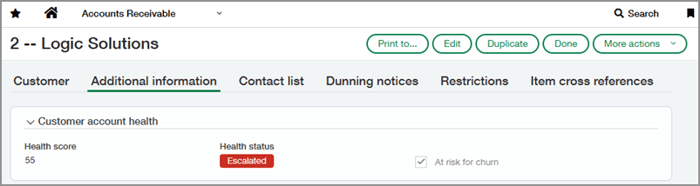
Customer health insights: Customer health insights introduces three new fields on the Customer record, providing a consistent way to store and use health information from your CRM, internal processes, or external systems. These fields enable finance teams to quickly identify risks and take proactive action to strengthen renewal plans.
cash management
Enhancements to setting up check printing: Check printing setup is now more straightforward and user-friendly. Enhanced options for addresses and logos allow precise check formatting, while unnecessary fields are no longer displayed.
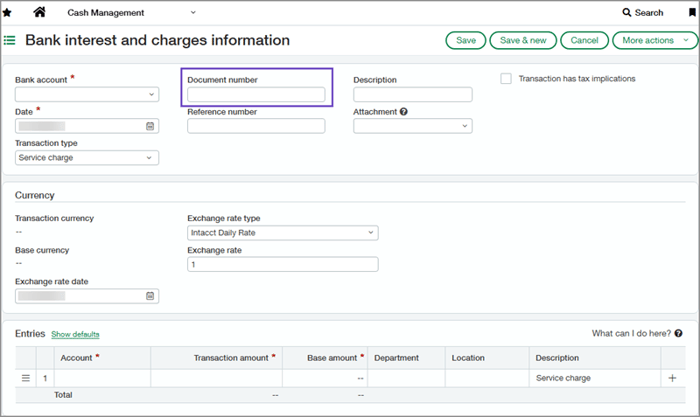
Document number now included on bank interest and charges information: Enhance accuracy during bank account reconciliation by utilizing the new Document number field on the Bank Interest and Charges page. This field appears on all relevant pages and reports where a document number is included.
File import data from Bank transaction assistant now appears on Banking cloud tab: Transactions imported through the Bank Transaction Assistant now display on your account's Banking cloud tab, just like bank feed data. This allows you to manage imported transactions consistently alongside those from bank feeds. View how it works here.
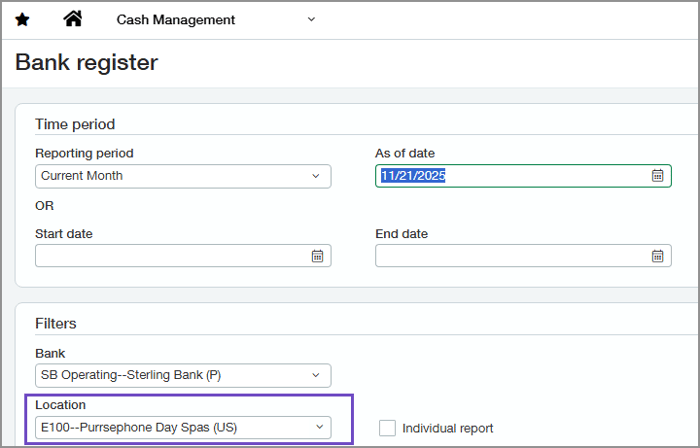
Entity location included automatically in Bank Register report: When run from within an entity, the Bank Register report now automatically incorporates the entity’s location, reducing errors caused by missing location information.
Contracts
Automate renewal pricing updates: This release introduces new CSV import and API options to help automate pricing updates, allowing for more efficient workflows and ensuring renewal pricing remains aligned with CPI changes.
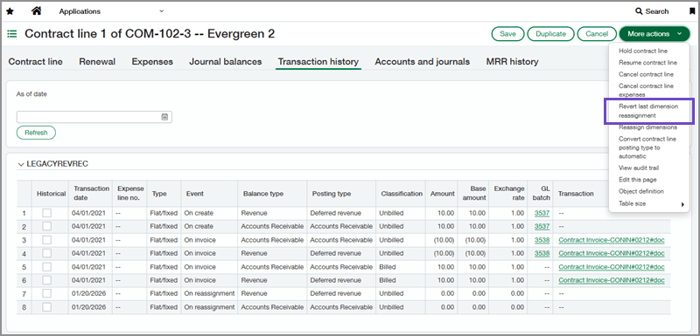
Revert dimension reassignment: This update enables you to correct errors by restoring the original dimensions in one step, eliminating the need to edit the General Ledger or perform reassignments later.
Fixed Assets Management
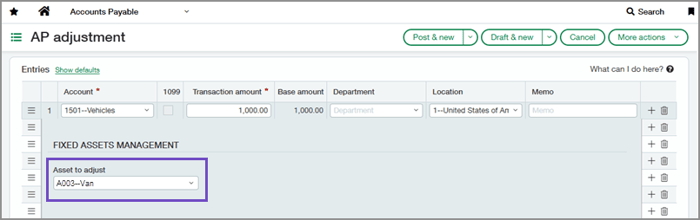
Update asset cost using AP adjustments: You can now adjust an asset’s cost directly through an AP adjustment. This enhancement simplifies the correction of asset values for capital improvements, revaluation, or previous acquisition inaccuracies.
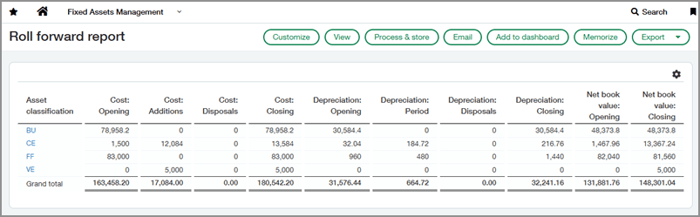
Roll forward report: This new report offers comprehensive insight into asset lifecycle changes over reporting periods, enabling teams to confidently reconcile the fixed assets subledger with the general ledger.
Flexible Asset GL account assignment: A restriction on Asset GL accounts has been lifted, and a new field has been added to bill and purchasing transaction lines, providing greater flexibility in your processes. View what has changed.
General Ledger
Announcing GL account reconciliations: Optimize your reconciliation workflow with GL account reconciliations, which simplify and accelerate the matching of offsetting debit and credit entries for more efficient review processes.
Enhanced Dynamic Allocations: The source account group can now be designated as the target for allocations, enabling you to distribute account balances across dimensions while preserving the original account balance using a single allocation definition.
inventory & supplies
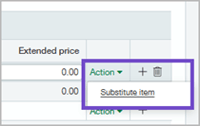
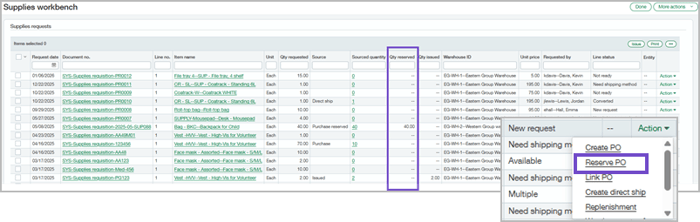
Flexible selection and reservation of supplies: If you don’t have enough of a requested supplies item, you can now set up substitutions for priority items. You can also automatically reserve items from a purchase order, so the requester gets priority for delivery.
order entry
Streamline billing with customer billing groups: Billing groups let you organize customers together, apply shared charges, and automatically generate invoices from a single location.
Purchasing
Line-level matching for AP Automation-General availability: Line-level document matching provides a more accurate method for automating transaction processing within AP Automation and Purchasing. Learn how AI helps with line -level matching.
tax
Streamlined tax totals in converted transactions: When Order Entry and Purchasing transactions with VAT or GST are converted to Accounts Payable or Accounts Receivable, net and tax amounts now appear together on a single line. Custom tax reports also reflect net and tax in one line for improved clarity.
Configure and run tax box reports-General availability: You no longer have to calculate VAT or GST tax returns outside of Sage Intacct to understand your upcoming tax liability. The new tax box report feature lets you calculate your tax burden for a specific period—using any standard or custom tax solution—without needing to close your books.
Exemption use codes and reporting location for Avalara AvaTax: View the two key enhancements to help customers manage their Avalara AvaTax integrations.
Time & Expense
Configure geofencing for time clocks-Sage Intelligent Time: With appropriate permissions, the Sage Intelligent Time and Expense mobile app can monitor employee locations and verify their position when clocking in or out. This ensures clear visibility into whether employees are within the designated boundaries during their shifts. See the benefits and how it works.
Sage Intelligent Time settings now centralized in Time preferences: Time settings, which were previously only found on the Configure Time page, are now also available on the Time Preferences page, bringing all options that impact Sage Intelligent Time together in one convenient location.
user interface
User interface changes: View the updated labels for clarity and consistency.
Help Center now opens in a new browser tab: Launching help in Sage Intacct now opens it in a new browser tab positioned next to your Sage Intacct tab.
Customers: Register for our R1 Release Webinar on February 19 to hear about these updates and more! Check your inbox for more information.