The newest release of Sage Intacct Construction 2026 is here! This release has several new updates for improved efficiency and streamlined processes that we know you'll want to take advantage of. It also includes enhancements to Sage Construction Management, Sage Intacct Paperless, and Sage Intacct Construction Payroll. Read some of the highlights below:
Construction Module
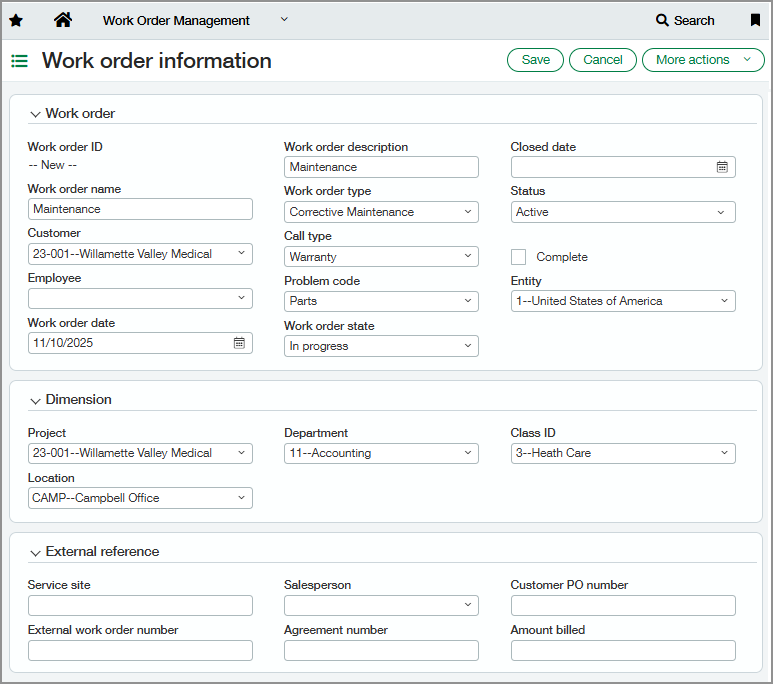
New Work Order Management Application and Dimension: Track and manage small-scale service-related work orders from complex projects. You'll have to configure the new application in General Ledger and wherever else you'd like to track the transactions (Projects, AP, Time, etc.).
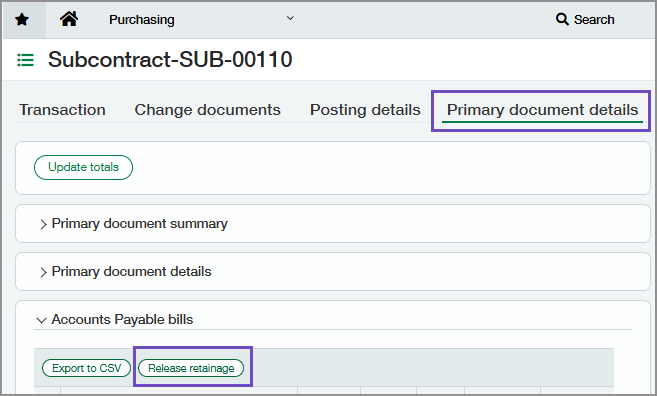
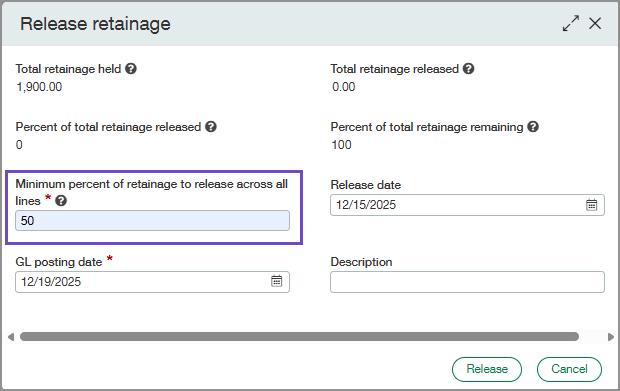
Flexible Retainage Release in Primary Document Details: Easily release retainage by percentage across all invoice lines on a primary document to streamline bulk vendor retainage releases. The new "Release Retainage" button opens a window where you're asked the minimum percent of retainage to release across all lines. You still have the option to release retainage per invoice line on the AP retainage release page as needed.
Enhancements in WIP Management: The new WIP Schedule Projects page allows you to set costs and/or billings for multiple projects at once by specifying a WIP period. The selected projects are then set to complete as of the specified WIP period.
Interactive Customer Report Writer (ICRW)
Construction Cost Type Reporting Area: The new Construction Cost Type reporting area improve the ability to track and manage projects.
New Order Entry by Project Report: The Order Entry (OE) report for Construction Real Estate (CRE) allows you to select a date that corresponds to the end of a WIP (Work In Progress) period and display the contract values for that period.
New Order Entry for WIP Import: The Order Entry (OE) report for Construction Real Estate (CRE) is intended to be used with the WIP import feature. This report summarizes by WIP schedule project and the Order Entry contract value as of a date selected at run time. Choose a date that corresponds to a WIP period end to get the contract values for that period. You can select a date that corresponds to the end of a WIP period and display the contract values for that period.
Sage Intacct Paperless
AR Sales Invoice Search: The document search page has been enhanced to allow users to search AR sales invoice data stored in the APFlow™ module. Users can also search on processor, exported or non-exported status, and save their search criteria for future use.
Report Scheduler: Users can now automate report runs using specified report parameters and schedule the report to be emailed to themselves.
Credit Card Importer Optimizations: We've improved the Credit Card Importer for better performance, enabling it to process significantly larger credit card transaction files.
Custom Fields and Manage Entry Fields: You can now configure settings such as width, display name, and formatting options for both custom and standard fields. These fields and settings are respected throughout Sage Intacct Paperless, including AR sales invoice entry, Approve AR sales invoices, and Credit card importer. They are also available to build routing and validation rules for custom entry and routing workflows.
Adding Additional Reviewers: Reviewers can now add additional recipients mid-route during the approval process. This enhancement speeds up approvals by allowing reviewers to add missing recipients without rejecting the AR sales invoice back to the processor and restarting the route. This permission can be set at the individual reviewer level.
Multiple POs on a single AR sales invoice: Users can code a single AR sales invoice to multiple purchase orders.
Sage Intacct Construction Payroll
Enhancements to Checks Window: The checks window now allows you to edit employee and employer portions of 401(k), pre-tax, after-tax, primary contribution, and catch-up contribution, and employee and employer tax amounts, with the ability to view taxable and taxed earnings during the override.
Updates to Check Generation: The check generation process has been enhanced to handle scenarios where company-paid benefit definitions on the prevailing wage table differ from those on the default cash fringe record.
For the full list of updated changes, click here.