

The Sage PDF Converter device is located in the Windows Printers and Scanners section. This device works with Sage 100 to create PDF documents (forms and reports) and save them on the server. Often, when an MS Windows update is applied, this device can become corrupted and will need to be reinstalled. This is an individual workstation issue and needs to be resolved on each affected computer.
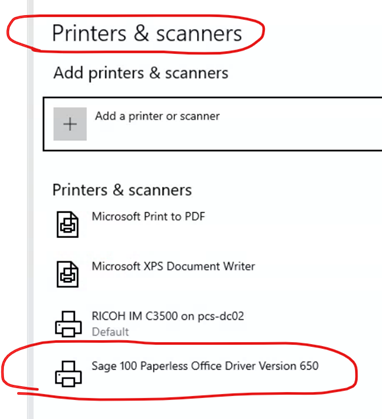
To uninstall and reinstall the Sage 100 Paperless Office Driver Version 650 printer (Sage 100 PDF Converter)
- Log on to Sage 100.
- Click File, then select Run.
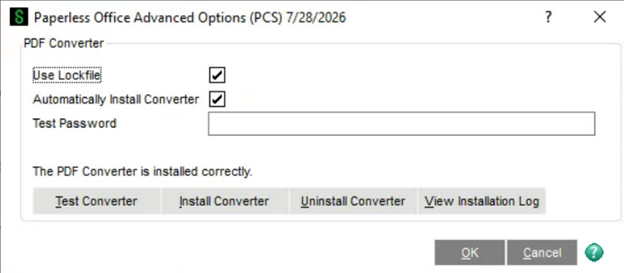
- Enter PL_AdvancedOptions_UI.
- Click OK.
- Click uninstall Converter.
- You many need to enter higher level security.
- Click Install Converter.
- It will need to install three separate items.
- Click Test Converter
- This will test the PDF creation using the converter device and create a test PDF. You can close the PDF once it displays on screen.
- Click OK after setup completes, exiting the window.
- Verify the PDF converter printer
- Open Start, Control Panel, then select Devices and Printers.
- Locate the Sage 100 Paperless Office Driver Version 650 printer.
- Verify it works within Sage by entering and printing a report or form.
Want More Sage 100 Features & Functions?
Make sure to subscribe to our blog to stay up-to-date on the latest insights and trends. We're dedicated to providing valuable resources for businesses looking to optimize their financial management with Sage 100.
 Check out these blogs to help get you started!
How to Reverse a Cash Receipt
Automate Your Accounts Receivable Workflow with Sage Connect
Leveraging Reports with Sage Business Intelligence
How to Improve Your Sales Order Entry Workflow