In the first blog of our 5 Days of Web Services Series, we mentioned the importance of using web services, how they can provide real-time interfaces between your Sage X3 instance and external third-party or customer applications, and how to create a SOAP pool. The second blog focused on creating and publishing web services by exposing objects and creating subprograms. The third blog focused on testing the published web services through object-based and sub-program testers. Our third blog focused on creating a new .NET project to consume an object-based web service from WSDL. Today, we'll finish off the five-day series by focusing on consuming subprogram-based web services from .NET.
5 Days of Web Services Series:
- Day 1 - Creating a SOAP Pool
- Day 2 - Creating and Publishing Web Services
- Day 3 - Testing Web Services
- Day 4 - Consuming Web Services in .Net
Day 5 - Consuming X3 Subprogram Web Services from .Net
X3 Web Services can be consumed from .net by using the web services WSDL from X3. Below are the steps to creating a new .Net project to consume X3 web services. To get started with the solution, instructions on adding the WSDL and creating the authorization class are covered in the blog post for Day 4, which covers creating the initial .net application for web service consumption.
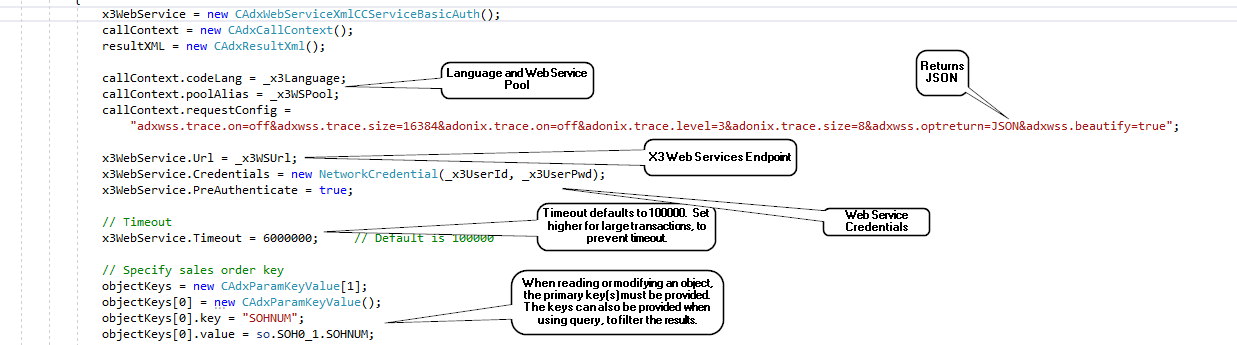
Initializing the Context
Below is a sample .net context initialization.
- X3 Language - i.e. “ENG”
- X3 WS Pool – this is the name of the web service pool defined in X3. This may or may not be the same as the endpoint, depending on how it was set up.
- Context – variable properties are defined here, including the return format (XML or JSON).
- Web Services Endpoint – this is added to the .config file by default when the WSDL is added to the project, but it can be changed. It should be specified here to override the original definition.
- Credentials – this is an X3 user. The user must be set up in X3 to allow web services access.
- Timeout – this can be increased if timeouts are occurring in web service calls.
- Object Keys – these are required for some types of web service calls, to read/update specific record, etc.
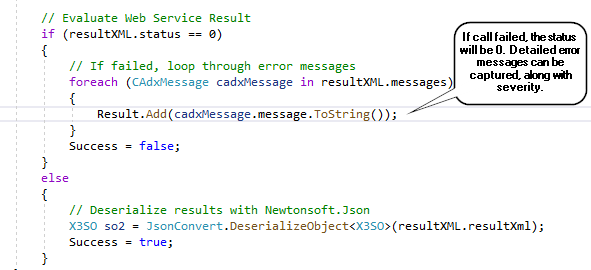
Error Handling
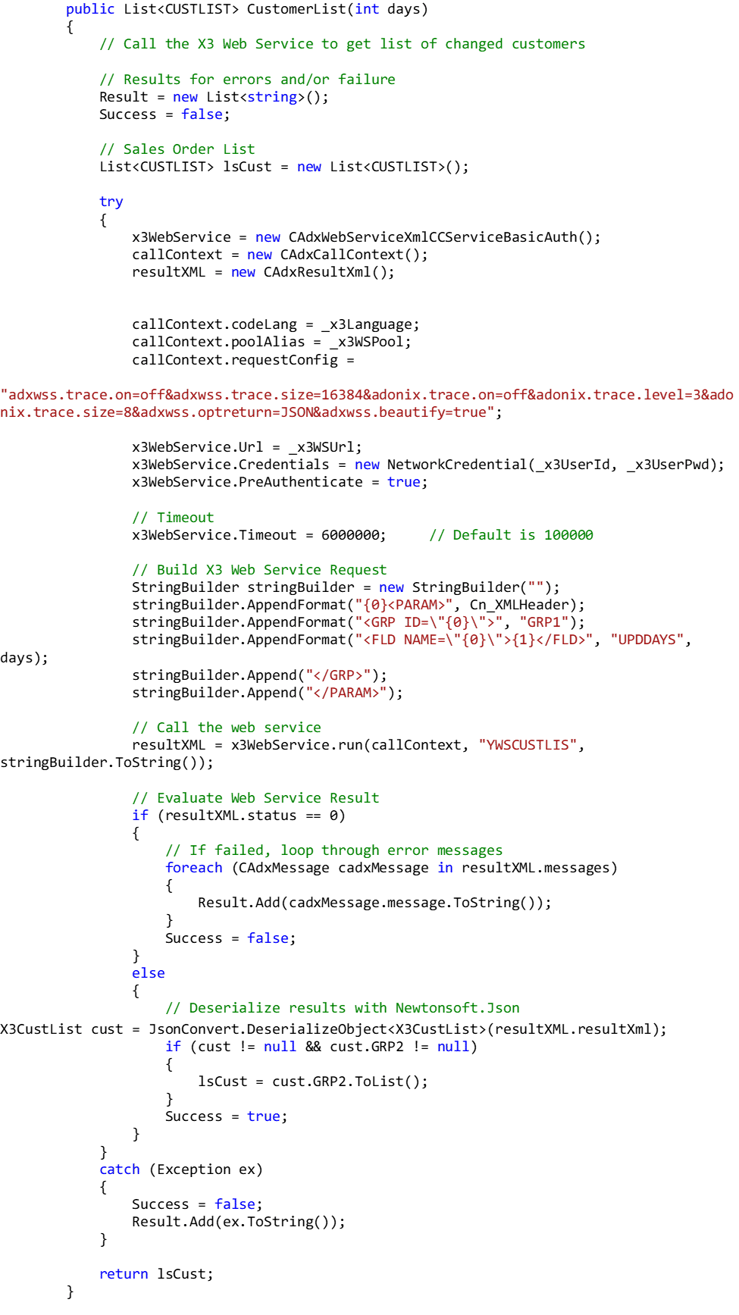
- The web service resultXML will contain a status of 0 (failed) or 1 (successful)
- If the status is 0, the error messages will be returned as an array of type CAdxMessage. These can be evaluated for severity, along with the message text.
Call an X3 Subprogram Web Service
Calling a web service that was published from an X3 subprogram requires use of the “run” method from the web services. Below is an example of the calling the YWSCUSTLIS subprogram that we created in the Day 2 series.
1. The first step is the initialize the call context and the basic authentication properties.
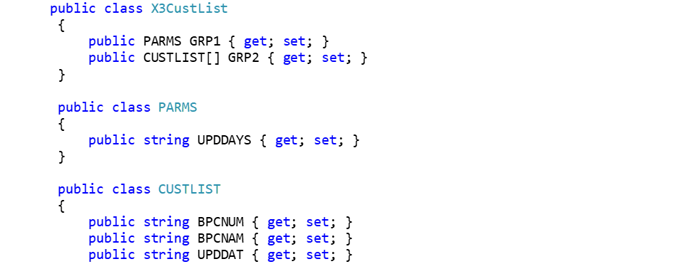
2. If the status is 1, the web service was successful. The web service result can be deserialized from an XML or JSON string into a pre-defined class.
3. The pre-defined class that the results are deserialized into is shown below.
You have now learned how to create a .net program to consume a subprogram-based web service.
Want More Sage X3 Features & Functions?
For some Sage X3 videos, head over to our YouTube page and subscribe to stay up-to-date with the latest insights and tutorials. Our channel is dedicated to providing valuable resources for businesses looking to optimize their financial management with Sage X3.

5 Days of Web Services Series:
Day 1 - Creating a SOAP Pool
Day 2 - Creating and Publishing Web Services
Day 3 - Testing Web Services
Day 4- Consuming Web Services in .NET