
Customize data entry grids to speed data entry by putting the fields in the most logical order for your data entry person. Hide from the grid fields that are not needed. This functionality must be performed by an Admin user. Changes made will affect all users.
Add, Remove, or Rearrange Fields on Data Entry Grids
- Go to the screen in Intacct you want to be modified
- Go to More actions > Edit Entries Layout.

- Drag and Drop Fields from Grid section to Detail section or re-sequence grid order. Look for gray bar to know when ok to drop the field.
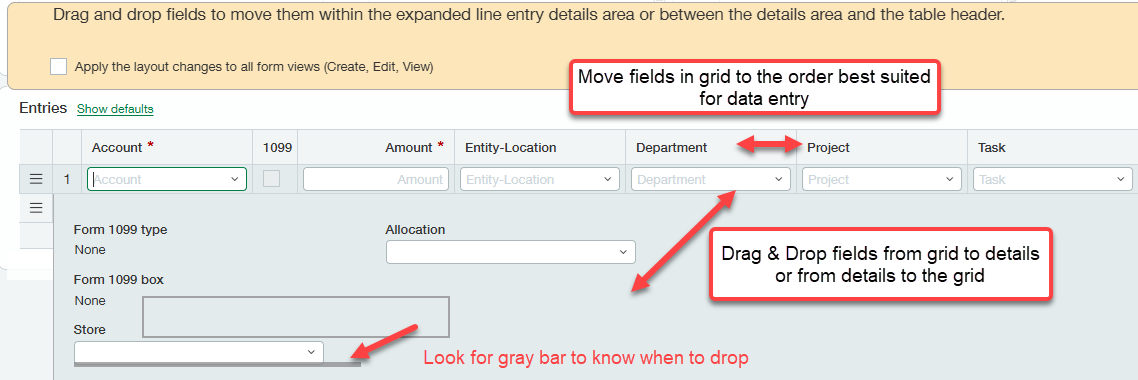
- When Finished, check the box to save the layout on all forms and then "Save layout."

For additional assistance when adding, removing, or rearranging fields on data entry grids in Sage Intacct; contact RKL eSolutions.
Looking for More on Sage Intacct?
For more helpful tips and tricks about Sage Intacct, subscribe to our blog and stay up-to-date with our latest tutorials. We're dedicated to providing valuable resources for businesses looking to optimize their financial management with Sage Intacct.
 Check out these blogs to help get you started!
Uploading Your Budgets Using Pre-Built Templates
How To Create Ad-Hoc Reports Using Views and Filters
Creating Expanded Columns and a Summary for Reports