Navigating the best way to record payment fees can be seamless with the right approach. Here’s how you can effectively manage these fees.
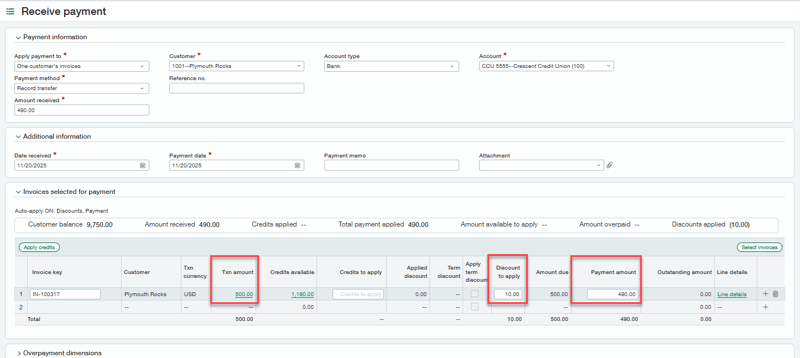
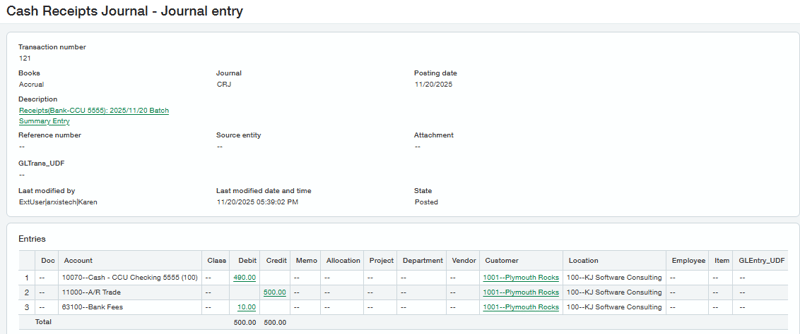
In the world of business transactions, discrepancies between invoiced amounts and actual payments received are common. Imagine this scenario: a customer has an outstanding invoice of $500, but due to a $10 processing or wire fee, only $490 is received. The challenge is to effectively write off the $10 fee while marking the invoice as settled. Let’s explore three options available in Sage Intacct to address this issue.
option 1
Create a Credit memo or Adjustment for $10 and then apply that credit to the invoice when entering the customer payment. This method is beneficial because it lets you select the GL account where you want to write off the amount, however you may not know the payment is less than the invoice until you are entering the payment.
option 2
Create an adjustment on-the-fly from the “Receive payments – New” screen and then apply it to the invoice. This shortcut is beneficial when the exact amount to be written off isn’t known initially, allowing for immediate adjustments and flexibility in choosing the GL account.
option 3
Utilize custom terms discounts to record the payment fees. Setup Terms with a discount of $0 and edit the discount amount at time of entering customer payment in the “Receive payments – New” screen. While the fastest method, terms discounts limit GL account flexibility requiring just one account to be defined in the AR Configuration.
Choosing the Right Method
Each method has its strengths and limitations. The credit memo approach offers comprehensive account flexibility; the on-the-fly adjustment is ideal for dynamic situations, and the custom discount method provides speed. Businesses should consider their specific needs, such as the importance of GL account flexibility versus processing speed, to choose the most suitable method.
See video here for demonstration of each method.
set up requirements
Setup required for Options 1 & 2: Permissions to enter AR invoices and/or Adjustments.
Setup required for Option 3: See below.
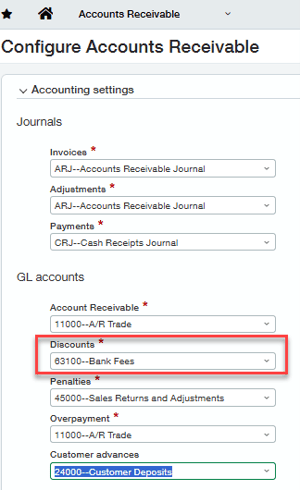
Setup required to use a terms discount to write off bank fees:
-
Configure A/R Discounts GL account to your bank fees account.
-
Configure A/R to Enable custom Discount.
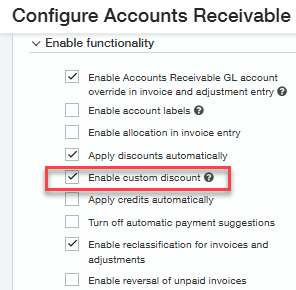
-
Set up your AR terms with a discount of $0.
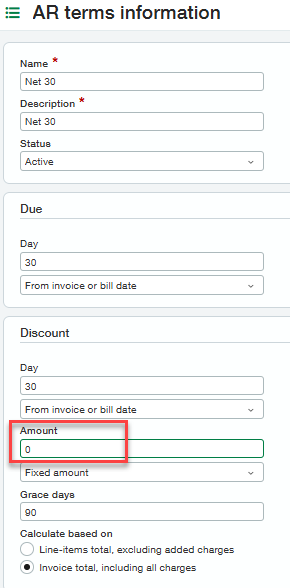
To receive guidance on what option would be the best choice for you or for additional help in recording payment fees in customer deposits, reach out to RKL eSolutions.
Looking for More on Sage Intacct?
For more helpful tips and tricks about Sage Intacct, subscribe to our blog and stay up-to-date with our latest tutorials. We're dedicated to providing valuable resources for businesses looking to optimize their financial management with Sage Intacct.
 Check out these blogs to help get you started!
Uploading Your Budgets Using Pre-Built Templates
How To Create Ad-Hoc Reports Using Views and Filters
Creating Expanded Columns and a Summary for Reports