%20copy.webp?width=824&height=432&name=Sage%20Intacct%20(19)%20copy.webp)
Sage Intacct’s third release of 2025 is now available! With new tools to enhance efficiency and decision-making, this update is designed to help you work smarter. Learn more about the updates below.
AI-Powered Automation
Calculate overtime in timesheets automatically - Sage Intelligent Time: Sage Intelligent Time (SIT) can now calculate overtime hours worked by employees. By creating and assigning overtime rules, you can ensure accurate, compliant payroll processes while boosting operational efficiency.
Smarter email capabilities for AP Automation: Smarter email capabilities bring key benefits, including auto-forwarding rules to save time and support for inline attachments, text from email bodies, and HEIC image files from iPhones. View more here.
Automated transactions without matching for AP Automation with Purchasing: Enhance efficiency with AI-powered transactions and the flexibility of the Purchasing application. Automate unmatched transactions, such as vendor invoices without purchase requisitions or orders.
Company and Administration
Authenticate and validate your custom email domain: Customers using a custom domain for email must authenticate and validate their domain with the enhanced email delivery service. This requirement is mandatory as we complete the transition to the upgraded service. View our blog to learn how.
Updates to Sage Intacct import service: Rather than sending your data into a black box and waiting for error reports via email, you now have a dedicated import workspace offering real-time visibility and control.
Accounts Payable
Delegate bill approvals when an approver is out of office: Bill approval delegation ensures uninterrupted workflow, allowing bills to progress smoothly even during vacations, leaves, or other absences.
Vendor payments powered by MineralTree: The new payment service integrates seamlessly with all your entities in Sage Intacct, supporting bill workflows and payment approvals. For AP Automation users, Vendor Payments can be added to existing workflows, enabling a fully automated end-to-end solution.
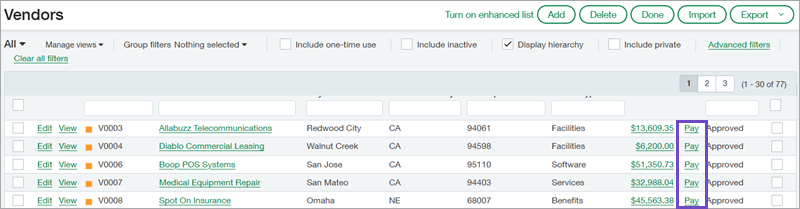
Pay bills from the Vendors list: Use the Pay option to directly pay a vendor from the Vendors list without disrupting your workflow. View more details.
Deactivate alternative Accounts Payable/Receivable accounts: Avoid accidental postings by deactivating unused alternative Accounts Payable/Receivable accounts. This update resolves the previous issue where errors occurred during account deactivation.
Create custom reports on payment approval history: Custom Report Writer (CRW) now includes a new object, allowing you to create tailored reports on Accounts Payable payment approvals.
Accounts Receivable
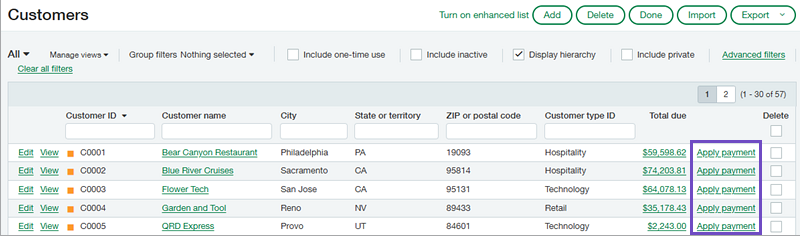
Apply payments from the Customers list: Use the Apply Payment option to receive customer payments directly from the Customers list without disrupting your workflow.
Enhancements to how you apply credits: We're pleased to introduce new enhancements that simplify the process of applying credits when receiving payments. View the benefits.
Enhancements to customer advances: Customer advances have been enhanced for better tracking with payment IDs, greater flexibility with draft advances, and a simplified process for receiving payments while applying an advance. Click to see the key benefits.
Import large volume bill back transactions: Simplify invoice processing by importing multiple bill back invoices simultaneously with the updated AR invoice CSV template. Just add the bill back template ID to the new column, and Intacct will automatically create the corresponding bills upon import.
Create custom reports on customer refunds: Custom Report Writer (CRW) now includes a new object, enabling you to create personalized reports on Accounts Receivable customer refunds.
Cash management
Improve bank transaction matching with more precise rules: Leverage additional fields from incoming bank transactions to customize matching, creation, and assignment rules. These expanded options enhance matching accuracy during reconciliations and streamline automatic customer assignments to bank transactions.
New NACHA payment file formats: Streamline payments to vendors and employees in Sage Intacct with new electronic bank file formats. NACHA bank payment files now include ID numbers for the recipients, saving you time and improving efficiency.
Funds transfers at the entity level now require at least one bank account from that entity: Intacct now verifies that at least one account belongs to the entity when adding a funds transfer at the entity level. If neither account is owned by the entity, a message is displayed, and the transaction is not posted. See how it works.
Upload digital signature in PNG file format for use on checks: The PNG file format has been added to the supported JPG and GIF formats, offering greater flexibility when creating digital signatures.
Fixed Assets Management
Provide your own accumulated depreciation for historical assets: You can now specify a custom accumulated depreciation amount when importing or creating historical assets.
Update assets in bulk using the import service: The import service now allows bulk updates to assets, saving time and minimizing manual work.
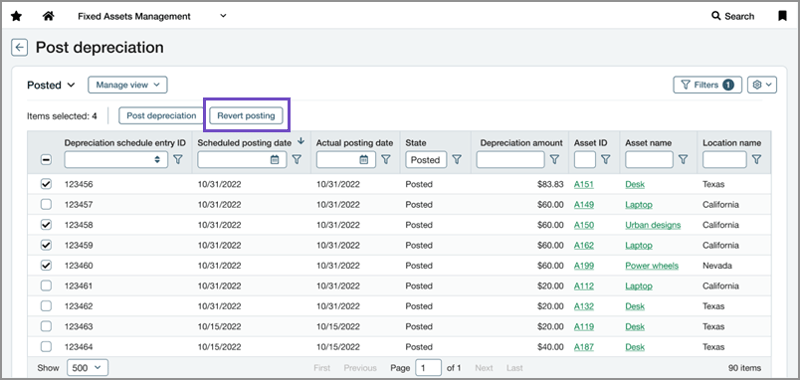
Revert posted depreciation entries in bulk: Easily revert multiple depreciation postings at once from the Post Depreciation page. This feature saves time and effort, whether correcting accidental postings or placing assets back into review.
Inventory & Supplies
Enhanced inventory reporting insights: The inventory valuation report provides an analysis of the value and quantity of specific items in stock, assisting in tracking the cost of goods sold (COGS) and ensuring effective inventory management. See what has changed.
Track inventory transfers more securely: Enhance inventory tracking capabilities with Warehouse Transfer transaction definitions. These comprehensive transaction tools are included with every new installation of Inventory Control, ensuring more efficient and accurate inventory management.
Order entry
Summarize OE revenue recognition entries: Revenue recognition postings to the General Ledger can now be summarized on a daily, weekly, or monthly basis. View the full benefits.
purchasing
New way to combine multiple documents into a single transaction: Based on valuable customer feedback, we introduced a time-saving multi-document conversion feature for the Construction application last year. This functionality is now accessible to all Purchasing subscribers.
Announcing Sage Intacct eProcurement: Access real-time product information and pricing, optimize spend management by leveraging negotiated discounts, and maintain compliance with procurement policies.
Gain clear visibility into match tolerance exceptions: The 2023 R3 release introduced match tolerance exception tracking for draft documents. This enhancement allows you to access a more comprehensive history of tolerance exceptions, enabling more precise tracking and resolution of mismatches.

Time & Expense
Timesheet entry grid is now customizable - Sage Intelligent Time: Sage Intelligent Time now offers the flexibility to customize the timesheet entry grid, providing greater control over how time is entered and displayed to suit your specific needs.
Calculate overtime in timesheets automatically - Sage Intelligent Time: Develop and implement overtime rules to ensure accurate, compliant payroll processing, while improving operational efficiency.
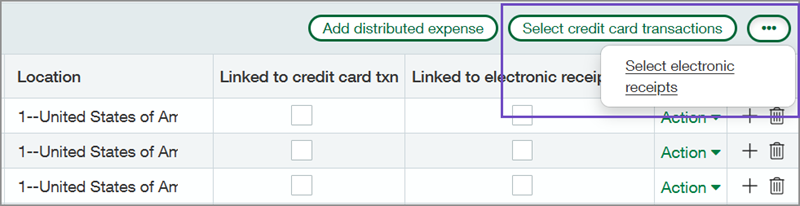
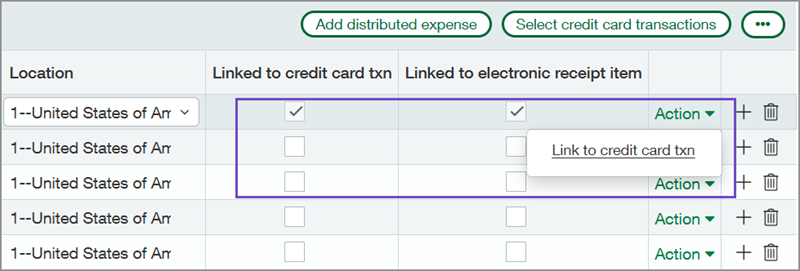
Link credit card transactions and electronic receipts to employee expense reports: Streamline employee expense reports by combining credit card transactions with electronic receipts for faster data entry. Linking these transactions automates expense creation, saving time and minimizing manual effort.
User Experience
Enhanced lists as the default experience: This experience is being introduced to customers in phases. Soon, enhanced lists will become your company's default setting.
Help content enhancements: We are introducing two new enhancements—user interface content toggle and language switcher—to elevate your Sage Intacct content experience. View more details.
Customers: Register for our RKL Advance Sage Intacct Virtual Day on August 20 and join the R3 Release session to get your questions answered live! Check your inbox for more information.